Somewhere in your family, there's probably a dusty book on a shelf—a published family history compiled decades before Ancestry.com existed. These legacy documents, often created between the 1850s and 1980s, represent years of pre-digital research that frequently proves more accurate than today's crowdsourced online trees.
In This Article
Thousands of these published family histories—formally compiled genealogies printed as books—exist scattered across family members, local libraries, and genealogical societies. They're deteriorating, not searchable online, and contain information found nowhere else. This guide will show you how to digitize, verify, and share these invaluable resources.
Why Published Family Histories Are Genealogical Goldmines
Before the internet, creating a family history required extraordinary dedication. Authors spent years traveling to courthouses, corresponding with distant relatives, and interviewing elderly family members who remembered the 1800s firsthand. They accessed records that have since been lost, destroyed, or remain undigitized.
What makes these books particularly valuable:
- Pre-internet research effort: Decades of work condensed into a single volume
- Primary source access: Interviews with people born in the 19th century
- Lost details: Family stories, occupations, and migration narratives not captured in vital records
- Surprising accuracy: Well-researched histories hold up remarkably well when verified against modern records
What You'll Find in Legacy Family Histories
A typical published family history contains multi-generational narratives spanning 5-10 generations, exact birth/marriage/death dates, source citations to original documents, family photographs, migration patterns, and occupational details. Many include indexes that make finding specific ancestors straightforward.
Assessing Your Book Before Digitizing
Before investing time in digitization, evaluate what you have:
- Physical condition: Note brittle pages, binding issues, or faded text that may affect scanning
- Publication details: Check the publisher, date, and author credentials (DAR member? genealogical society affiliation?)
- Scope: Which family lines are covered? What geographic regions and time periods?
- Unique elements: Photographs, maps, or source citations that make this copy particularly valuable
Is Your Book Already Digitized?
Before starting, check whether someone has already done the work. Search FamilySearch Books, Internet Archive, Google Books, and HathiTrust. If your book is already available digitally, you can skip to verification and transcription.
Copyright note: Books published before 1928 are generally in the public domain. For books published 1928 or later, copyright may still apply—check before sharing widely.
The Digitization Process: Step-by-Step
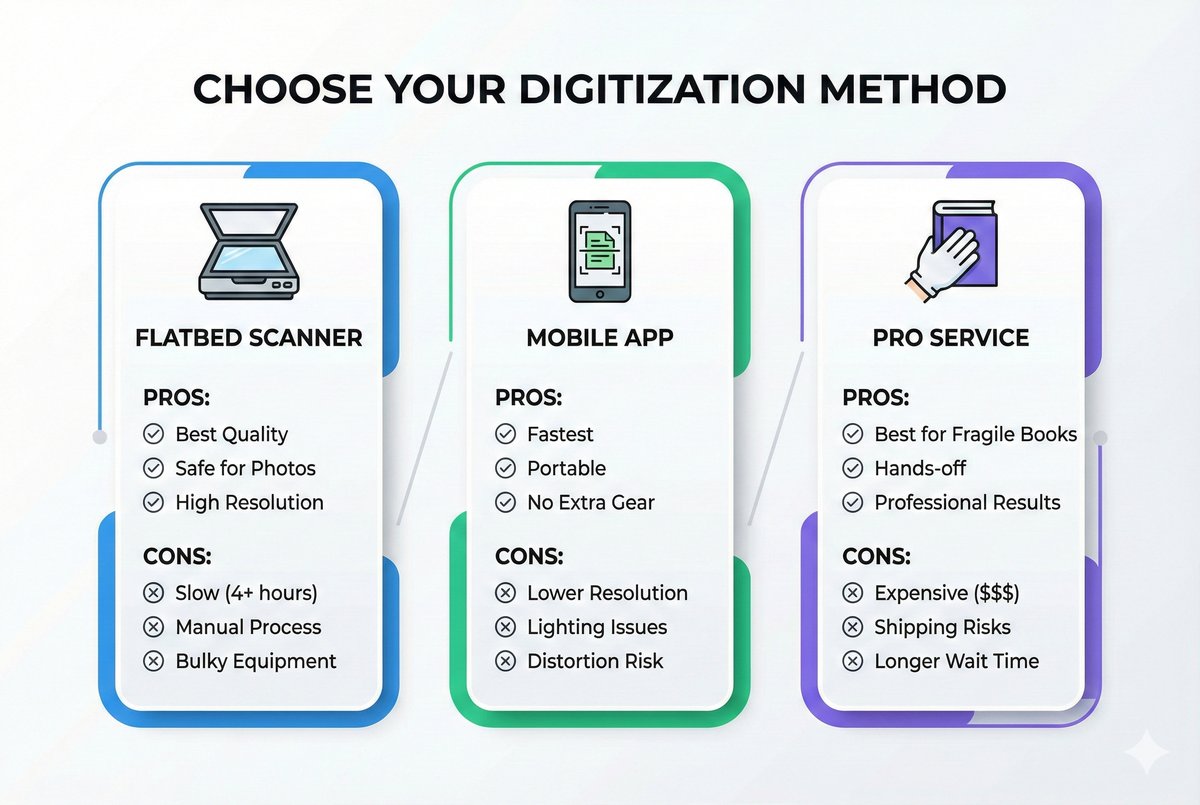
Choose your digitization method based on the book's condition, your budget, and time available.
Method 1: Flatbed Scanner (Best Quality)
For books in good condition with photographs you want to preserve at high quality, flatbed scanning produces the best results. Scan at 300+ DPI, save as PDF or high-resolution JPEG, and use a book cradle to protect the binding. Expect 2-4 hours for a 200-page book.
Method 2: Smartphone Scanning Apps
Apps like Microsoft Lens, Adobe Scan, or Google PhotoScan offer a faster alternative. These apps automatically crop pages, correct perspective, and enhance text readability. Quality is lower than flatbed scanning, but the speed advantage is significant—you can capture a 200-page book in under 2 hours.
Method 3: Professional Digitization
For extremely fragile books or when you need high-quality OCR accuracy, consider professional services. Local copy shops or specialized genealogy digitization companies typically charge $1-3 per page. This option works best for rare or irreplaceable volumes.
Making Your Scans Searchable with OCR
OCR (Optical Character Recognition) converts scanned images into searchable, editable text. Accuracy ranges from 90%+ for clear modern print to 60-80% for older typefaces. Adobe Acrobat Pro, ABBYY FineReader, and free tools like Tesseract can add OCR to your scanned PDFs. Always proofread OCR output before using it for transcription.
Transcribing and Organizing the Content
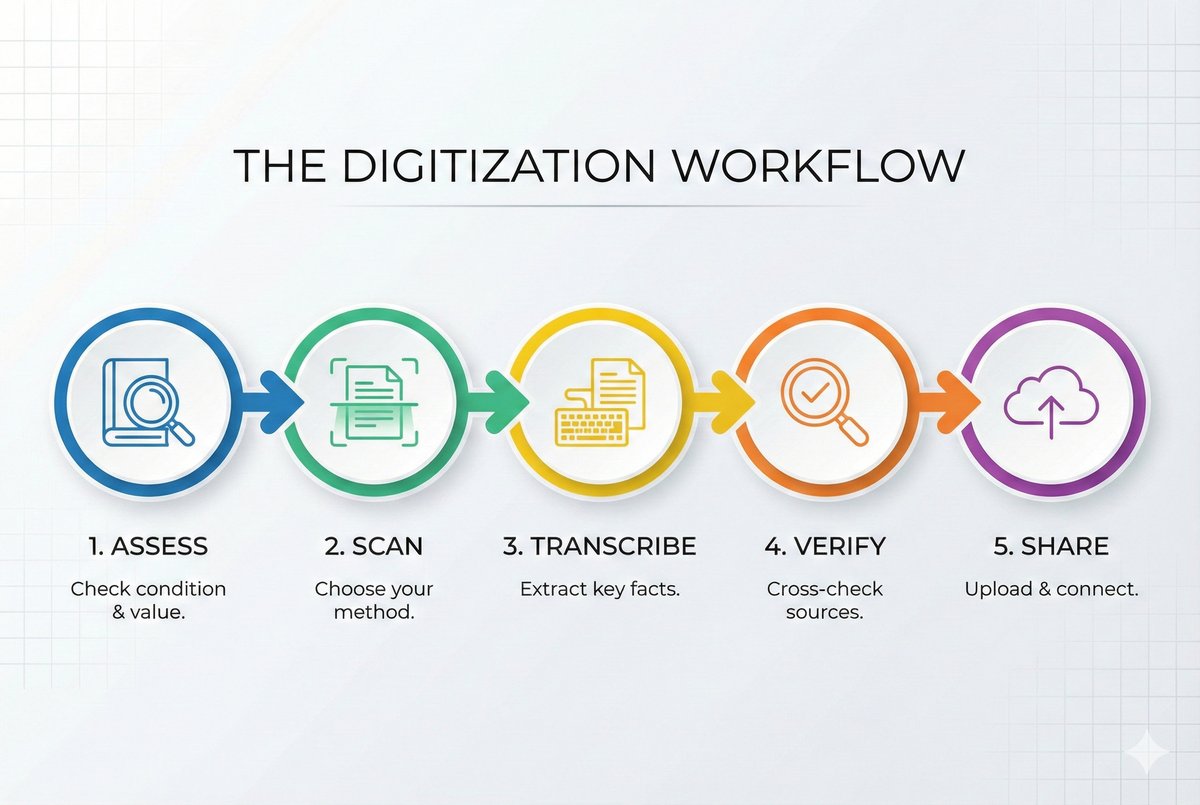
You don't need to transcribe everything. Prioritize strategically:
- Vital records first: Birth, marriage, and death dates and places for direct ancestors
- Source citations: The bibliography and footnotes reveal the author's research path
- Family narratives: Migration stories and historical context often aren't captured in databases
- Indexes: Surname lists help you quickly find relatives you didn't know existed
Transcription Best Practices
Use genealogy software like Ancestry Member Trees, FamilySearch Family Tree, or desktop applications like RootsMagic to organize extracted information. For each fact, create a source citation that includes the book title, author, publication date, and page number. Preserve original spellings and wording in quotations—use [sic] to note obvious errors while maintaining the original text.
Create a "working document" where you note discrepancies and questions that arise during transcription. These become your research to-do list.
Fact-Checking Legacy Family Histories
Even well-researched books contain errors—copying mistakes, family legends accepted as fact, or conclusions based on limited record access. Verification strengthens your research and often reveals new leads.
Verification Strategy
Focus on key ancestors in your direct line first:
- Compare against vital records: Birth certificates, marriage records, and death certificates
- Check census data: Ages, birthplaces, and family composition should align
- Verify cited sources: Can you find the original documents the author referenced?
- Test against DNA: Do claimed relationships align with your DNA matches?
Understanding Accuracy Patterns
Books published by genealogical societies or for DAR/lineage society applications typically maintain higher accuracy standards. Local and regional histories from the 1880s-1920s often prove reliable because authors interviewed living witnesses. Exercise more caution with vanity publications or books lacking source citations—though even error-prone books contain valuable leads worth pursuing.
Sharing Your Digitized History Online
Once digitized and verified, sharing your work benefits the broader genealogy community.
Where to Share
- FamilySearch Memories: Upload PDFs and attach them to relevant profiles in the Family Tree
- Ancestry: Add as "Stories & Publications" attached to your Member Tree
- Internet Archive: For public domain books, create permanent free access for all researchers
- WikiTree: Free collaborative family tree with strong source documentation culture
Sharing Best Practices
Include complete citation information when sharing: title, author, publication date, and publisher. Add page numbers to extracted information so others can verify. Tag relevant surnames and locations to help researchers find your digitized book. Consider creating surname-specific extracts for genealogy forums and mailing lists.
Frequently Asked Questions
How long does it take to digitize a 200-page family history book?
Using a flatbed scanner, expect 2-4 hours for scanning plus 1-2 hours for OCR processing. Smartphone scanning apps reduce this to 1-2 hours total. Full transcription of genealogical data adds 5-15 hours depending on the book's structure and how much detail you want to capture.
Should I transcribe everything or just key facts?
Start with vital records, source citations, and family narratives directly relevant to your research. Scan the entire book for preservation, but prioritize transcribing information for your active research lines. You can always return to transcribe additional sections later.
How do I know if a published family history is accurate?
Check for source citations throughout the book—well-researched histories document their claims. Verify key facts against vital records, census data, and other primary sources. Books published by genealogical societies typically have higher accuracy standards, but even books with errors often contain valuable leads worth investigating.
Can I legally share a digitized family history book online?
Books published before 1928 are generally in the public domain in the US. For books published 1928 or later, copyright may still apply. When in doubt, share excerpts with proper citation rather than complete books, or contact the publisher or author's estate for permission.
Summary
- Pre-digital goldmines: Published family histories often contain information found nowhere online
- Check first: Search FamilySearch Books and Internet Archive before digitizing
- Choose your method: Flatbed scanner (best quality), smartphone apps (fastest), or professional services (fragile books)
- Transcribe strategically: Vital records and source citations first
- Verify key facts: Even accurate books benefit from modern record verification
- Share your work: FamilySearch Memories, Ancestry, and Internet Archive reach other researchers
Organize Your Digitized Family History
After digitizing a family history book, GenConverse can help you organize and analyze the extracted data. Import your transcribed information via GEDCOM, use our validation tools to identify potential errors, and explore connections between published histories and your existing research. Try Genie to get started.